This section only gives a brief description of the framework focussing on the extensions made for OpenStreams. A full description of the current version of the framework can be found at http://www.pcraster.eu.
In order to build a dynamic model you will needs to define a model class and add several methods to the class to describe the model behaviour. The easiest way to get started is to copy and modify the wflow_sceleton.py example model. You can also use the other models for inspiration.
In order to facilitate reusing data between models the data is stored in the following directory tree:
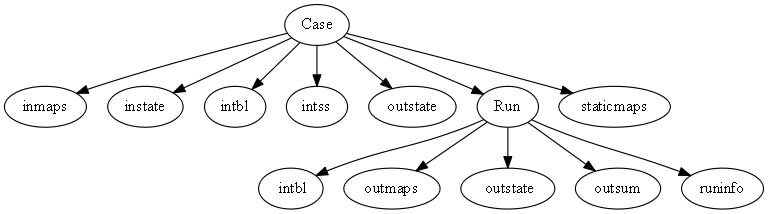
Although it is possible to deviate from this layout it is highly recommended to adhere to this if you build your own model. Also make sure you use an ini file to specify model settings instead of putting those in the python code.
A basic sceleton of a model is given below:
This simple model calculates soil temperature using air temperature as a forcing.
Usage: wflow_sceleton -C case -R Runid -c inifile
-C: set the name of the case (directory) to run
-R: set the name runId within the current case
-c name of the config file (in the case directory)
$Author: schelle $ $Id: wflow_sceleton.py 898 2014-01-09 14:47:06Z schelle $ $Rev: 898 $
The user defined model class. This is your work!
Required
The init function must contain what is shown below. Other functionality may be added by you if needed.
Required
Returns a list of state variables that are essential to the model. This list is essential for the resume and suspend functions to work.
This function is specific for each model and must be present. This is where you specify the state variables of you model. If your model is stateless this function must return and empty array (states = [])
In the simple example here the TSoil variable is a state for the model.
| Variables: | TSoil – Temperature of the soil [oC] |
|---|
Optional
Supplies the current time in seconds after the start of the run This function is optional. If it is not set the framework assumes the model runs with daily timesteps.
Ouput:
- time in seconds since the start of the model run
Required
Suspends the model to disk. All variables needed to restart the model are saved to disk as pcraster maps. Use resume() to re-read them
This function is required.
Required
Initial part of the model, executed only once. It reads all static model information (parameters) and sets-up the variables used in modelling.
This function is required. The contents is free. However, in order to easily connect to other models it is advised to adhere to the directory structure used in the other models.
Required
This function is required. Read initial state maps (they are output of a previous call to suspend()). The implementation showns here is the most basic setup needed.
Optional
Return a default list of variables to report as summary maps in the outsum dir.
Required
This is where all the time dependent functions are executed. Time dependent output should also be saved here.
Optional
Perform command line execution of the model. This example uses the getopt module to parse the command line options.
The user can set the caseName, the runDir, the timestep and the configfile.
#!/usr/bin/python

"""
Definition of the wflow_sceleton model.
---------------------------------------

This simple model calculates soil temperature using
air temperature as a forcing.

Usage:
wflow_sceleton  -C case -R Runid -c inifile

    -C: set the name  of the case (directory) to run

    -R: set the name runId within the current case

    -c name of the config file (in the case directory)

$Author: schelle $
$Id: wflow_sceleton.py 898 2014-01-09 14:47:06Z schelle $
$Rev: 898 $
"""

import numpy
import os
import os.path
import shutil, glob
import getopt
try:
    from  wflow.wf_DynamicFramework import *
except ImportError:
    from  wf_DynamicFramework import *

try:
    from  wflow.wflow_adapt  import *
except ImportError:
    from  wflow_adapt import *
import scipy


def usage(*args):
    sys.stdout = sys.stderr
    for msg in args: print msg
    print __doc__
    sys.exit(0)

class WflowModel(DynamicModel):
  """
  The user defined model class. This is your work!
  """

  def __init__(self, cloneMap,Dir,RunDir,configfile):
      """
      *Required*

      The init function **must** contain what is shown below. Other functionality
      may be added by you if needed.

      """
      DynamicModel.__init__(self)
      setclone(Dir + "/staticmaps/" + cloneMap)
      self.runId=RunDir
      self.caseName=Dir
      self.Dir = Dir
      self.configfile = configfile


  def stateVariables(self):
      """
      *Required*

      Returns a list of state variables that are essential to the model.
      This list is essential for the resume and suspend functions to work.

      This function is specific for each model and **must** be present. This is
      where you specify the state variables of you model. If your model is stateless
      this function must return and empty array (states = [])

      In the simple example here the TSoil variable is a state
      for the model.

      :var TSoil: Temperature of the soil [oC]
      """
      states = ['TSoil']

      return states


  def supplyCurrentTime(self):
      """
      *Optional*

      Supplies the current time in seconds after the start of the run
      This function is optional. If it is not set the framework assumes
      the model runs with daily timesteps.

      Ouput:

          - time in seconds since the start of the model run

      """

      return self.currentTimeStep() * int(configget(self.config,'model','timestepsecs','86400'))

  def suspend(self):
    """
      *Required*

      Suspends the model to disk. All variables needed to restart the model
      are saved to disk as pcraster maps. Use resume() to re-read them

      This function is required.

    """

    self.logger.info("Saving initial conditions...")
    #: It is advised to use the wf_suspend() function
    #: here which will suspend the variables that are given by stateVariables
    #: function.
    self.wf_suspend(self.Dir + "/outstate/")


  def initial(self):

    """
    *Required*

    Initial part of the model, executed only once. It reads all static model
    information (parameters) and sets-up the variables used in modelling.

    This function is required. The contents is free. However, in order to
    easily connect to other models it is advised to adhere to the directory
    structure used in the other models.

    """
    #: pcraster option to calculate with units or cells. Not really an issue
    #: in this model but always good to keep in mind.
    setglobaloption("unittrue")


    self.timestepsecs = int(configget(self.config,'model','timestepsecs','86400'))

    self.basetimestep=86400
    self.SaveMapDir = self.Dir + "/" + self.runId + "/outmaps"
    self.TEMP_mapstack=self.Dir + configget(self.config,"inputmapstacks","Temperature","/inmaps/TEMP")
    self.Altitude=readmap(self.Dir + "/staticmaps/wflow_dem")
    self.logger.info("Starting Dynamic run...")


  def resume(self):
    """
    *Required*

    This function is required. Read initial state maps (they are output of a
    previous call to suspend()). The implementation showns here is the most basic
    setup needed.

    """
    self.logger.info("Reading initial conditions...")
    #: It is advised to use the wf_resume() function
    #: here which pick up the variable save by a call to wf_suspend()
    try:
        self.wf_resume(self.Dir + "/instate/")
    except:
        self.logger.warn("Cannot load initial states, setting to default")
        for s in self.stateVariables():
            exec "self." + s + " = cover(1.0)"


  def default_summarymaps(self):
      """
      *Optional*

      Return a default list of variables to report as summary maps in the outsum dir.
      """
      return ['self.Altitude']

  def dynamic(self):
      """
      *Required*

      This is where all the time dependent functions are executed. Time dependent
      output should also be saved here.
      """

      Temperature = self.wf_readmap(self.TEMP_mapstack,0.0)
      self.TSoil = self.TSoil + 0.1125 * (Temperature - self.TSoil) * self.timestepsecs/self.basetimestep

      # reporting of maps and csv timeseries is done by the framework (see ini file)


# The main function is used to run the program from the command line

def main(argv=None):
    """
    *Optional*

    Perform command line execution of the model. This example uses the getopt
    module to parse the command line options.

    The user can set the caseName, the runDir, the timestep and the configfile.
    """
    global multpars
    caseName = "default"
    runId = "run_default"
    configfile="wflow_sceleton.ini"
    _lastTimeStep = 10
    _firstTimeStep = 1
    timestepsecs=86400
    wflow_cloneMap = 'wflow_subcatch.map'

    # This allows us to use the model both on the command line and to call
    # the model usinge main function from another python script.

    if argv is None:
        argv = sys.argv[1:]
        if len(argv) == 0:
            usage()
            return

    opts, args = getopt.getopt(argv, 'C:S:T:c:s:R:')

    for o, a in opts:
        if o == '-C': caseName = a
        if o == '-R': runId = a
        if o == '-c': configfile = a
        if o == '-s': timestepsecs = int(a)
        if o == '-T': _lastTimeStep=int(a)
        if o == '-S': _firstTimeStep=int(a)

    if (len(opts) <=1):
        usage()

    myModel = WflowModel(wflow_cloneMap, caseName,runId,configfile)
    dynModelFw = wf_DynamicFramework(myModel, _lastTimeStep,firstTimestep=_firstTimeStep)
    dynModelFw.createRunId(NoOverWrite=False,level=logging.DEBUG)
    dynModelFw._runInitial()
    dynModelFw._runResume()
    dynModelFw._runDynamic(_firstTimeStep,_lastTimeStep)
    dynModelFw._runSuspend()
    dynModelFw._wf_shutdown()


if __name__ == "__main__":
    main()